How to Make Business Holiday Cards with Your Logo
By Pure Greetings ·
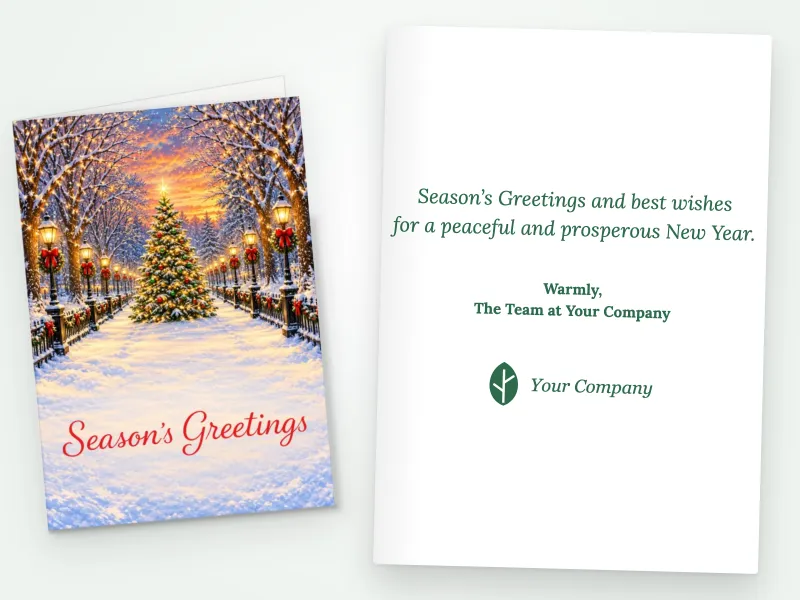
Adding your logo turns an ordinary holiday card into a company card. Done well, it reminds every client who sent it. Done badly, it makes a warm greeting feel like a flyer. Here's how to get business holiday cards with your logo right, from where the logo goes to the file you upload.
The golden rule: greeting first, brand second
People keep cards that feel like gifts and recycle cards that feel like marketing. So the most important design decision is restraint:
- Let the artwork and greeting lead the front. The front of the card should look like a holiday card first.
- Keep the logo small and tidy. A modest logo looks confident. A huge one looks like an ad.
- Leave the sales message out. No offers, no phone numbers in bold, no "call us in the new year." The logo is the reminder.
Where should the logo go?
Inside the card (the classic choice)
The inside, under your message and signature, is the most natural spot. It reads like a letterhead: here's who this is from. Nearly every branded Christmas card should carry the logo here.

On the front (for a stronger brand)
A small logo on the front, under the greeting, works well when your brand is well known to your recipients or when the card goes to a broad list where instant recognition helps. Keep it small enough that the artwork still leads.
At Pure Greetings you can place your logo on the front, inside, or both, and you see a live preview before you order. You can try it on any of our business holiday cards with your logo.
Preparing your logo file
The single biggest cause of disappointing custom business Christmas cards with logos is a low-quality file. A logo that looks fine on a website can print blurry. Before you upload:
- Use a PNG with a transparent background if you have one. It sits cleanly on the card without a white box around it. A JPG works too.
- Use the largest version you have. We need at least 300 pixels, but bigger is better for print. Ask your designer or marketing team for the "print" or "high-res" version.
- Avoid screenshots and email signatures. They're almost always too small.
- Check contrast. A white logo disappears on a white card. Use your full-color or dark version.
- Crop extra space. Trim empty margins so the logo sizes correctly.
Your logo prints in full color, so you don't need to simplify it to one or two colors.
Signatures: printed or by hand?
You can upload a scanned signature to print inside the card, which saves time on large orders. For your most important clients, though, nothing beats a real pen. A common approach:
- Print the company signature line ("From all of us at…") on every card.
- Hand-sign or add a one-line note to your top accounts.
Matching the card to your brand (without overdoing it)
You don't need a card in your exact brand colors. In fact, holiday artwork in reds, greens and winter blues usually looks better than a card forced into corporate colors. Your brand shows up through the logo, the message and the voice of your writing. For help with the words, see what to write in a business holiday card.
Choosing the greeting
Your logo is on the card, so the greeting speaks for your company. Many businesses choose Happy Holidays or Season's Greetings for a broad list, and Merry Christmas when it fits their clients and culture. We cover the trade-offs in Merry Christmas or Happy Holidays?
Logo card checklist
- Get a high-resolution PNG (transparent) or JPG of your logo.
- Pick a design where the artwork leads.
- Place the logo inside, and on the front only if recognition matters.
- Write a short message with no sales pitch.
- Check the live preview: is the logo sharp, readable and modestly sized?
Holiday cards with your company logo are a small investment that keeps your name on desks through December. Design yours on our Christmas cards with your company logo page, or see volume pricing on our business Christmas cards page.